
Agent Communication
Keeps the agent's writing in plain business language, from operation descriptions to summaries.
To be useful, AI agents require skills – reusable guidance that the agent reads through before taking action.
At Gravity, our teams of climate and energy experts continuously create new skills for the Gravity Agent. We have trained 85+ skills so far, which codify expertise to migrate data, identify cost-saving energy projects, and draft disclosures, among many other uses.
A skill is detailed written guidance that an agent reads before doing a specific kind of task, including both instructions and context.
Every skill the Gravity Agent has been trained on, in plain language. Filter by what you’re trying to get done.
Keeps the agent's writing in plain business language, from operation descriptions to summaries.
Applies emission factors from sources like EPA, Defra, and EcoInvent, including spend-based factors and inflation or currency adjustments.
Estimates emissions for physical and financial assets.
Evaluates battery storage as a decarbonization or demand-charge reduction strategy and scans sites for good candidates.
Reads an uploaded bill of materials, assigns emission factors to each line item, and builds a PCF from it.
Creates, edits, and manages custom metrics, metric groups, and custom metric values.
Builds and manages external information requests and supplier surveys to create custom emission factors.
Walks through the technical parts of Reduce, including setting targets and business-as-usual growth rates.
Steps and best practices for creating a complete sustainability report.
Explains what Gravity tracks for business travel (Scope 3 Category 6) and how to get good data for it.
Processes and uploads business travel files (air, hotel, rail, rental car, rideshare) into Scope 3 Category 6.
Overview of the custom and calculated metrics used in reporting.
Runs stateless calculations from the calculation registry, like ESRS metrics, without writing results anywhere.
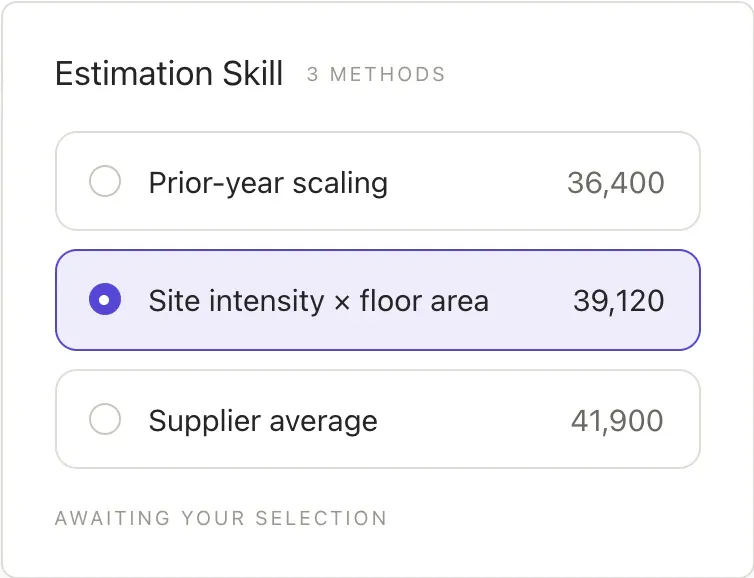
Estimates electricity or natural gas consumption when a reporting period has no site-level data.
Guidance on preparing and submitting data for CDP reporting.
The full lifecycle for building, grouping, and submitting changesets for review.
Finalizes and closes out reporting periods and emissions reports.
Benchmarks and compares emissions across sites, facilities, or time periods.
Creates and updates emission-factor automation rules, including retroactive application when factors change.
Overview of custom metrics, data requests, surveys, and supplier engagement, with routes to the right build skills.
Fills in or estimates missing consumption data for a reporting period.
Imports emissions data from a CSV or Excel file, mapping columns and attaching the source file along the way.
Migrates data from external platforms into Gravity and configures your setup to match your requirements.
Covers data completeness, file and data statuses, and how to resolve common data flags.
Builds summaries, aggregates, tables, and sums across your emissions or consumption data.
Analyzes a site's energy profile, finds decarbonization opportunities, models interventions, and creates reduction plans.
Scans platform data to find sites that may qualify for demand response programs.
Gravity's carbon accounting domain model: entities, scopes, units, emission sources, plans, and projects.
Identifies and resolves duplicate data entries.
Analyzes historical emissions data to identify trends and patterns.
Explains what employee commuting data to collect and how to align it with the GHG Protocol.
Uploads HR and commuting data to calculate employee commuting emissions.
Guidance on emissions from the end-of-life treatment of sold products (Scope 3 Category 12).
Turns third-party energy audits like Sensorfact, Carbon Trust, ESOS, and ISO 50001 into ready-to-evaluate projects.
Diagnoses and fixes a failed changeset dry-run.
Routes and transforms Excel and CSV uploads so they import cleanly.
Validates the contents of an uploaded Excel or CSV file before anything is imported.
Uploads and links source files to every data row added from a file, so each number traces back to its document.
Guidance on calculating and reporting financed emissions (Scope 3 Category 15).
Guidance on calculating and reporting franchised emissions (Scope 3 Category 14).
Guidance on Scope 3 Category 3 emissions from fuel and energy related activities.
Estimates fugitive and refrigerant emissions for a site using an ASHRAE approach based on its area and purpose.
Identifies where to focus emissions reduction efforts based on your existing data.
Reviews best practices for HVAC projects and spots obvious opportunities in your platform data.
Creates and manages to-do items for users in the Gravity inbox.
Covers LED lighting upgrades: costs, savings, and whether they fit your sites.
Assigns or updates market-based emission factors across your data.
Walks you through calculating market-based emissions step by step.
Exports a formatted methodology supplement document straight from Gravity.
Infers and applies NAICS codes so emission factors map to the right activities.
Best practices for setting up and managing organizational structures.
Sets up your organization hierarchy of orgs and sites from a file or a plain description.
Explains PCAF data quality scoring for financed emissions and how to apply it.
Explains what a product carbon footprint covers, how it differs from an EPD or LCA, and when to use each.
Getting started with Gravity: navigation, team management, onboarding, and common questions.
Identifies power factor issues on your bills and lays out steps to correct them.
Guidance on emissions from the processing of sold products (Scope 3 Category 10).
Breaks a product's footprint down by line item to show where emissions concentrate, then models reduction levers against total product carbon.
Imports purchasing data into Gravity, including general ledgers, expense reports, and balance sheets.
Runs a thorough quality check and validation across your data.
Uploads and includes renewable energy certificates such as RECs, GOs, and I-RECs in your footprint.
Overview of the Reduce module: the marketplace, RFPs, pre-negotiated rates, and referrals.
Models energy projects and plans to map a path toward your emission reduction targets.
Creates and manages emissions reports, including reporting periods, sections, and GHG inventory reports.
Guidance on compliance and submission for California's SB 253 climate disclosure law.
Overview of Science Based Targets initiative (SBTi) requirements and alignment.
Plans and models emission reduction targets in alignment with SBTi.
Guidance on building and managing your own skills within the platform.
Covers solar, PPAs, and solar financing, and scans your sites for good solar candidates.
Converts utility and fuel invoice spend into estimated energy volumes when a spreadsheet has costs but no consumption data.
Manages suppliers and supply chain emissions, including Scope 3 Category 1 purchased goods and services.
Creates and distributes questionnaires to collect primary data from suppliers.
Uses and manages supplier-specific emission factors for Scope 3 Category 1.
Best practices and conventions for tagging data and entities in the platform.
Explains what transportation and distribution data to collect and how to align it with the GHG Protocol.
Uploads and processes data directly from logistics and transportation providers.
A map of the Gravity web app: where to find features and how to get around.
Guidance on emissions from upstream leased assets (Scope 3 Category 8).
Guidance on emissions from the use of sold products (Scope 3 Category 11).
Finds billing errors that qualify for refunds and uncovers opportunities for energy projects.
Imports utility bill data from PDF, CSV, or Excel into providers, accounts, meters, bills, and line items.
Explains the Utility Bill Management module, its core functions, and why it matters.
Guidance on calculating emissions from waste generated in operations (Scope 3 Category 5).
Estimates water consumption using a CBECS approach based on site details like square footage.